
Registration Requirements
We operate in Ontario under the Alcohol and Gaming Commission of Ontario framework, so there are a few strict points to respect. You must be physically located in Ontario to use the regulated iGaming market. Our geolocation service checks your location during play, so a real-money account only functions within provincial borders.
The AGCO Internet Gaming Operator Application Guide states that registration is required for entities operating an internet gaming site within Ontario.
Creating an account usually takes around 3-5 minutes if you have your ID on hand. Quick tip: For the fastest registration, have your government-issued ID ready and ensure your device’s location settings are enabled before you begin. During signup we ask for personal details and then complete identity checks afterwards. While your profile is under review, deposits and gameplay are allowed, but withdrawals are only processed once KYC verification is fully approved.
Account Creation Steps
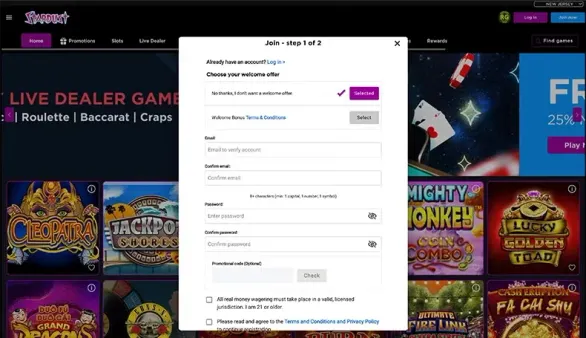
You can join us through on.stardustcasino.com in your browser or by installing our Ontario app from the Apple App Store or Google Play. The Sign Up button is on the homepage.
- Click Sign Up on the main page
- Enter your full legal name exactly as on your government ID
- Add your date of birth so it confirms you are 19+
- Provide a valid email address you use regularly
- Create a username - it is permanent and cannot be changed later
- Set a password with at least 8 characters, numbers and symbols
- Enter your Canadian mobile phone number
- Read and accept the terms and conditions
Right after that we send a verification email. It is important to open it and follow the link within 24 hours. If the link expires, you will need to go through the registration from the start.
Identity Verification
Once the account is created, we need to confirm who you are. You can upload a government-issued photo ID. For proof of address, government-issued documentation may be required. The name and details on these documents should match each other and your account.
In your account settings there is an upload section where you can add clear photos or scans. Our team normally reviews documents within 24-48 business hours, depending on queue volume. If an image is blurred, cropped, or unreadable, it will be declined and we let you know what needs to be corrected before you send it again.
| Verification Stage | Documents Needed | Processing Time |
|---|---|---|
| Identity | Government-issued photo ID | 24-48 hours |
| Address | Utility bill or statement | 24-48 hours |
| Age | Birth date on your ID | Instant |
| Location | Device geolocation access | Real-time |
Geolocation Setup
To comply with Ontario rules, we need permission to access your device location. The first time you log in, you will see a pop-up asking for this access. If you decline, deposits and real-money games will not be available.
On iOS you can adjust this in Settings, then Privacy, Location Services, and enable location for Stardust Ontario Casino. On Android, go to Settings, then Location, App Permissions, select our app and turn on location access.
The location check runs while you play. When you move outside Ontario, access may be interrupted until geolocation confirms you are back in the province. Once you are back in the province and geolocation confirms it, your access is restored and you can continue.
Account Settings
After verification, you can fine-tune your details and preferences in the account dashboard. Your username is locked in, but you can change your email address as long as you verify both the old and the new email. For password changes, we ask for your current password, and if you turned on two-factor authentication, you will need that too.
In the responsible gaming section, you can set personal deposit limits starting from C$10 per day, week or month. When you lower a limit, it takes effect right away. If you raise a limit, the change is delayed by 24 hours. You can also turn on session reminders to appear every 30, 60, or 90 minutes to help you keep track of your play time.
First Deposit
The minimum deposit with us is C$10, the same across all supported methods. We currently accept Interac, bank transfer, VISA, MasterCard, PayPal and Trustly. Interac e-Transfer usually lands in your account balance within 15-30 minutes, while standard bank transfers may take from 1 to 3 business days.
To fund your account, open the Deposit section from the account menu, choose a payment option, type in the amount, and follow the authentication prompts for that method. Your playable balance updates as soon as the transaction is confirmed.